Kondory Technology - Last-mile software
Skip to main content
Kondory: AI virtual assistant Online
0:00 Recording voice note…
Developed by Kondory Tecnología
¡Hola soy tu asistente virtual con I.A. !

Last-mile logistics software

For courier and parcel companies. It tracks every waybill from the moment it arrives from the carrier until it is delivered with photo and signature, and reconciles each courier's collections.

In short

What is Kondory's last-mile software?

It is a web platform with a courier app that runs a courier or parcel company's operation: waybills from several carriers, warehouse, dispatch, deliveries with proof and digital signature, returns, cash-on-delivery collection and reports. Kondory fits it to each company's operation.

It was built on a real last-mile operation and is configured for each company.

See how it works
Real screenshot of the system, with sample data.

Solution sheet

Who it is for
Courier and parcel companies and last-mile operators
Coverage
City and towns, with waybills sorted by destination
Type
Web platform and courier app
Challenge
Manage the whole delivery cycle, from waybill intake to delivery and collection, with traceability and proof.
Integrations
ENVÍA, Solistica (AGV) and TCC
Scope
Tracking, proof and digital signature, waybills and dispatch, warehouse and inventory, collections and reconciliation.
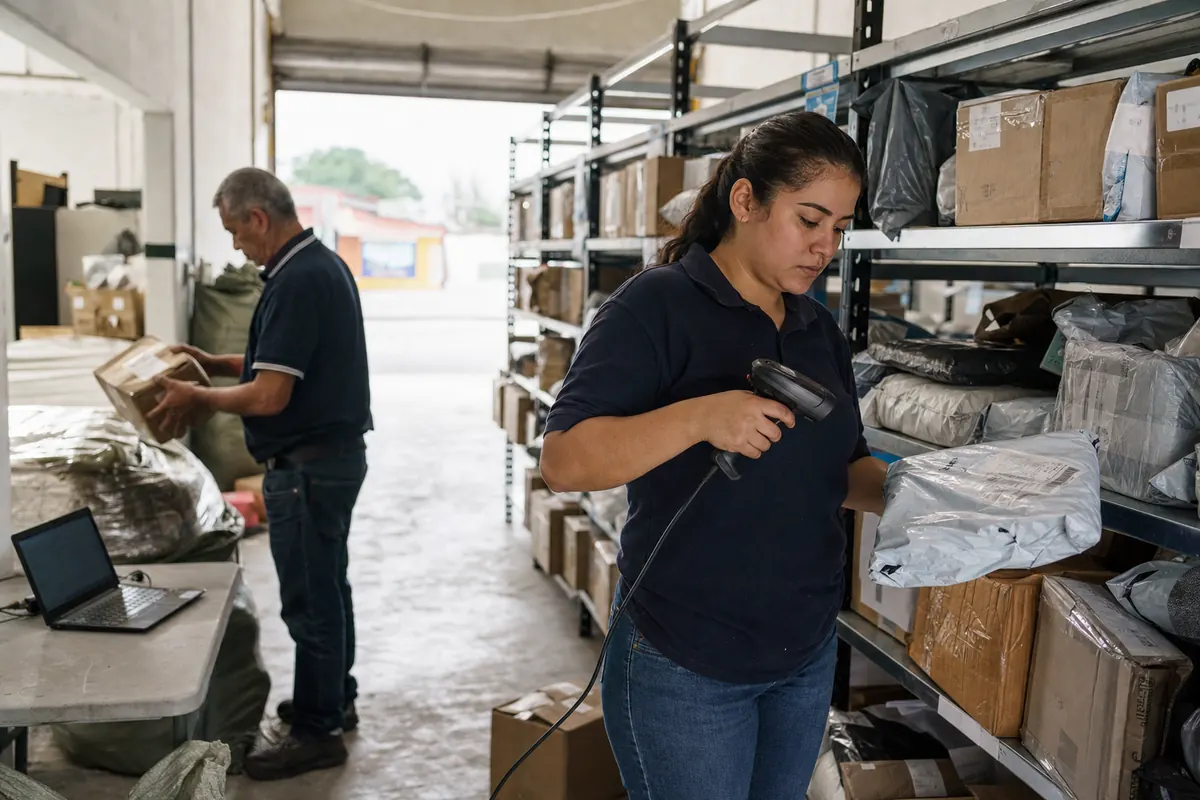
Parcel warehouse staff sorting shipments by town on metal shelves
Sorting by town
The problem

A parcel goes through many hands before it arrives

The waybill comes from a carrier, the parcel is stored in the warehouse, leaves with a courier and comes back as a delivery, a return or cash collected. A courier company needs to see that whole journey in one place.

  1. 01

    Waybills arriving from several carriers that must be sorted by town.

  2. 02

    Parcels in the warehouse that must be found fast by waybill, recipient or status.

  3. 03

    Couriers on the street reporting deliveries, returns and cash collected.

  4. 04

    Recipients and carriers asking where each shipment is.

How it works

What the last-mile software looks like inside

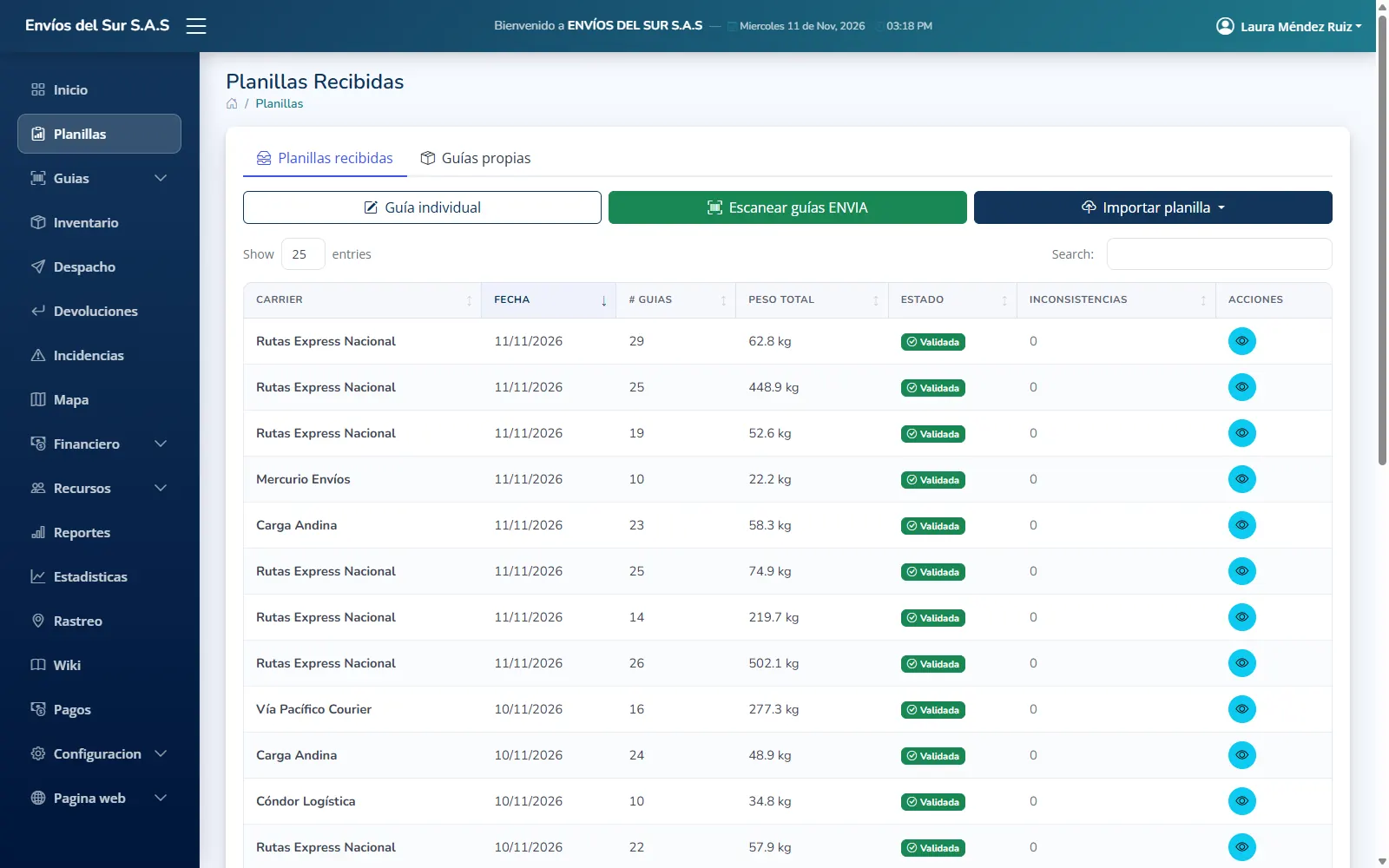
The journey of a waybill, step by step: from the carrier manifest to the reconciled collection.

Receiving of carrier manifests with number of waybills, total weight and validation
Step 1 of 8 · Receiving

Each carrier’s manifests, validated

Manifests arriving from carriers, with number of waybills, weight, validation status and inconsistencies.

  • Import manifestsEach carrier’s file comes in with its columns mapped.
  • Validation by scanningOne by one or in bulk, to confirm what actually arrived.
  • Own waybillsCreate individual waybills with their calculated rate and export the manifest to Excel or PDF.

Validated waybills go to the warehouse, where they are sorted and located.
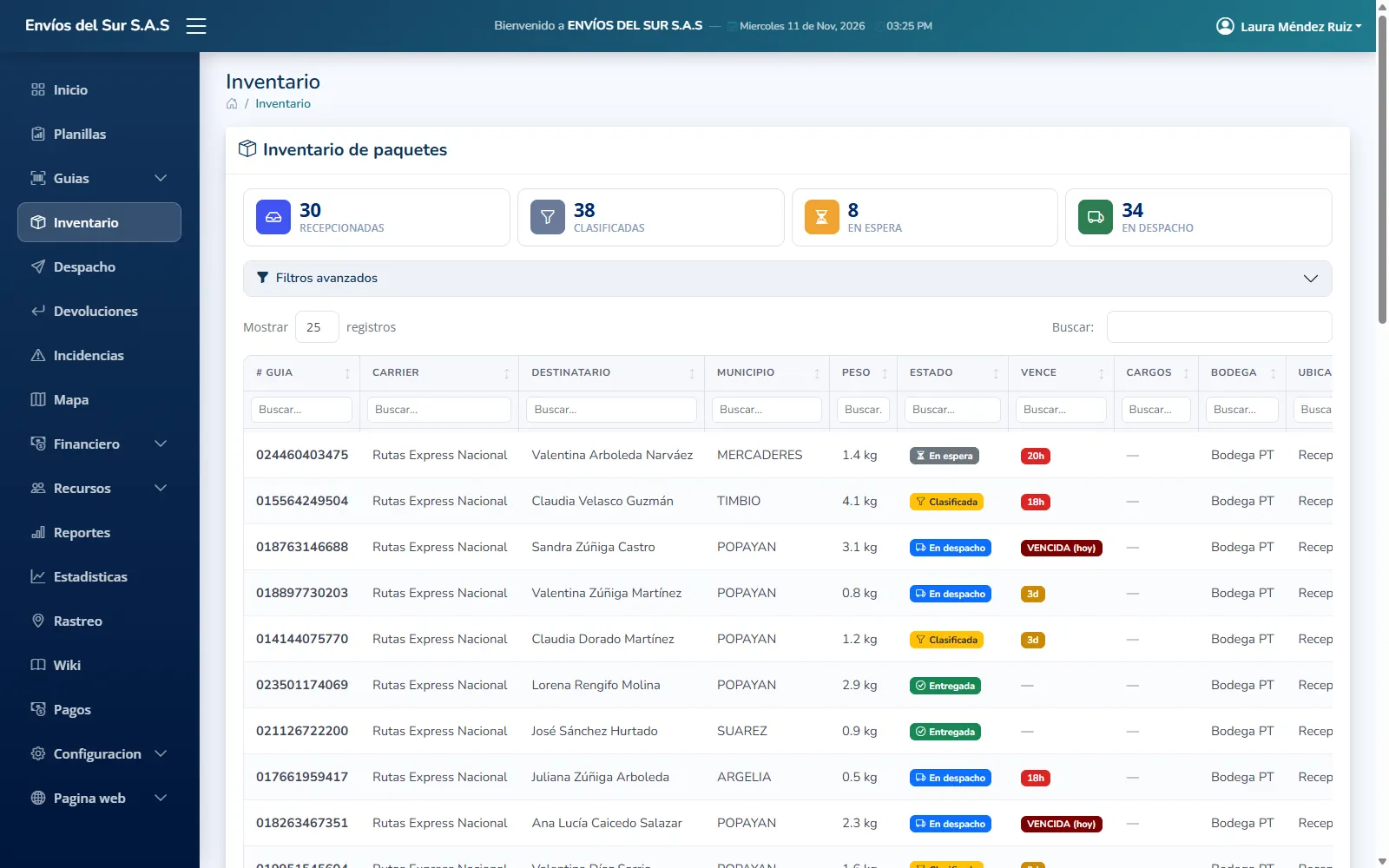
Warehouse parcel inventory with status, due date and location of each waybill
Step 2 of 8 · Warehouse

Every parcel with its location and due date

The parcel inventory by status, with carrier, recipient, town, weight, due date, warehouse and location.

  • LocationsZone, shelf and bin to find each parcel.
  • Move and trackEvery move is saved in the waybill history.
  • Filterable inventoryBy status, carrier and due-date urgency.

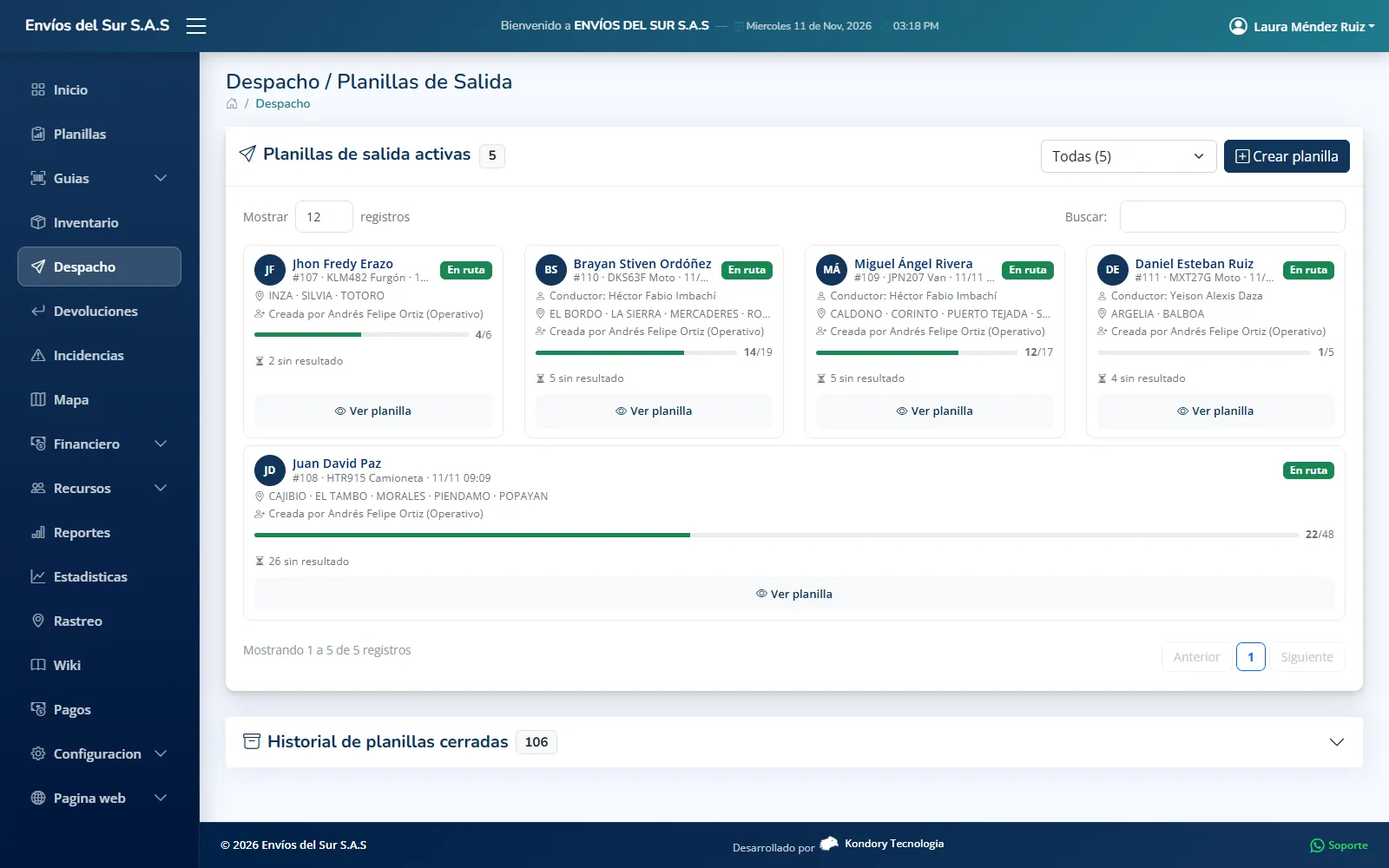
Waybills sorted by town are assigned to a dispatch manifest.

Dispatch manifests on route with courier, vehicle, towns and delivery progress
Step 3 of 8 · Dispatch

Dispatch manifests with courier and route

Each manifest on route with its courier, vehicle, driver, towns and delivery progress.

  • Create the manifestWith the responsible courier, driver and vehicle.
  • Adjust on routeAdd towns, remove waybills or hand the manifest over to another courier.
  • PDF manifestReady to print and hand to the courier.

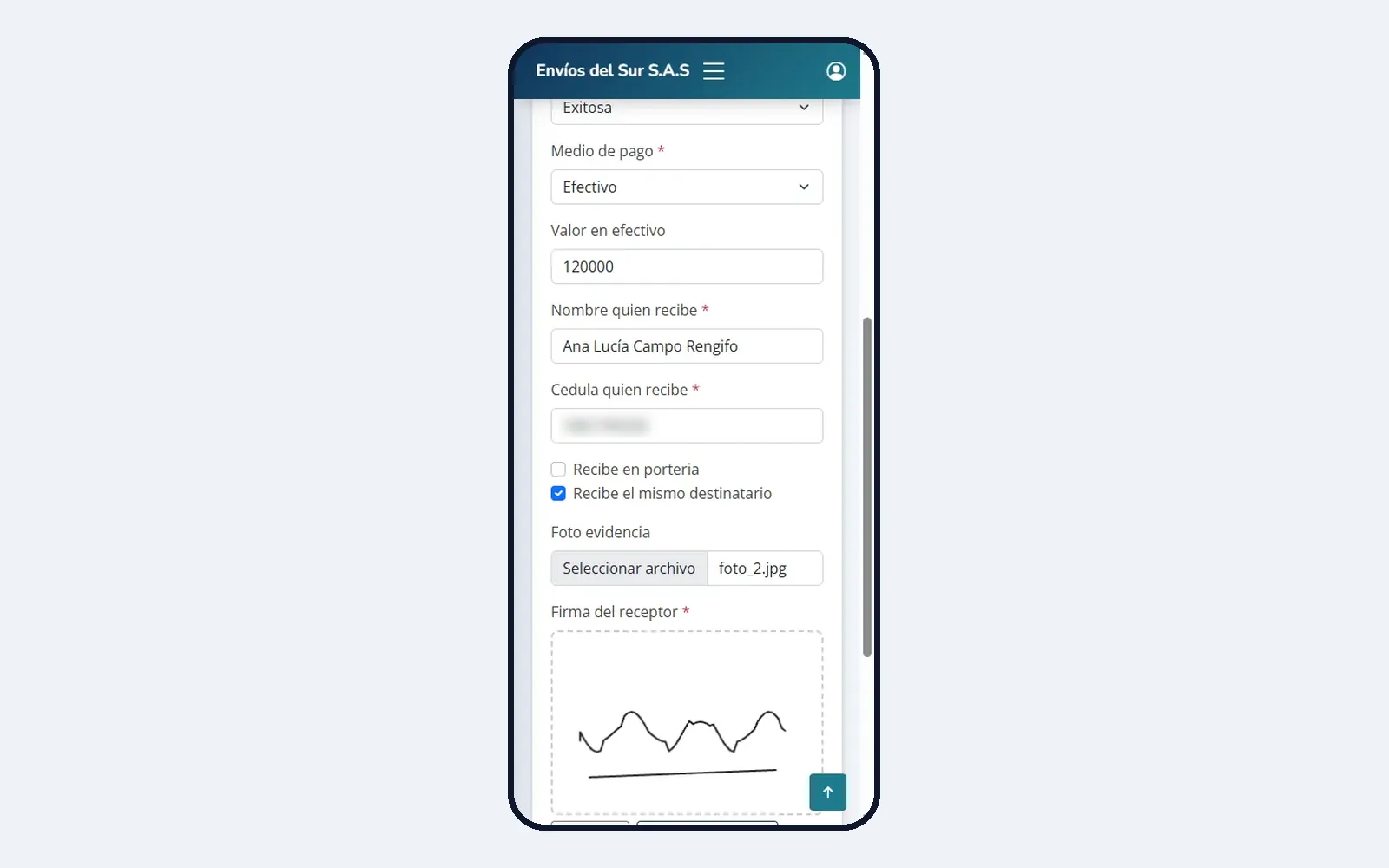
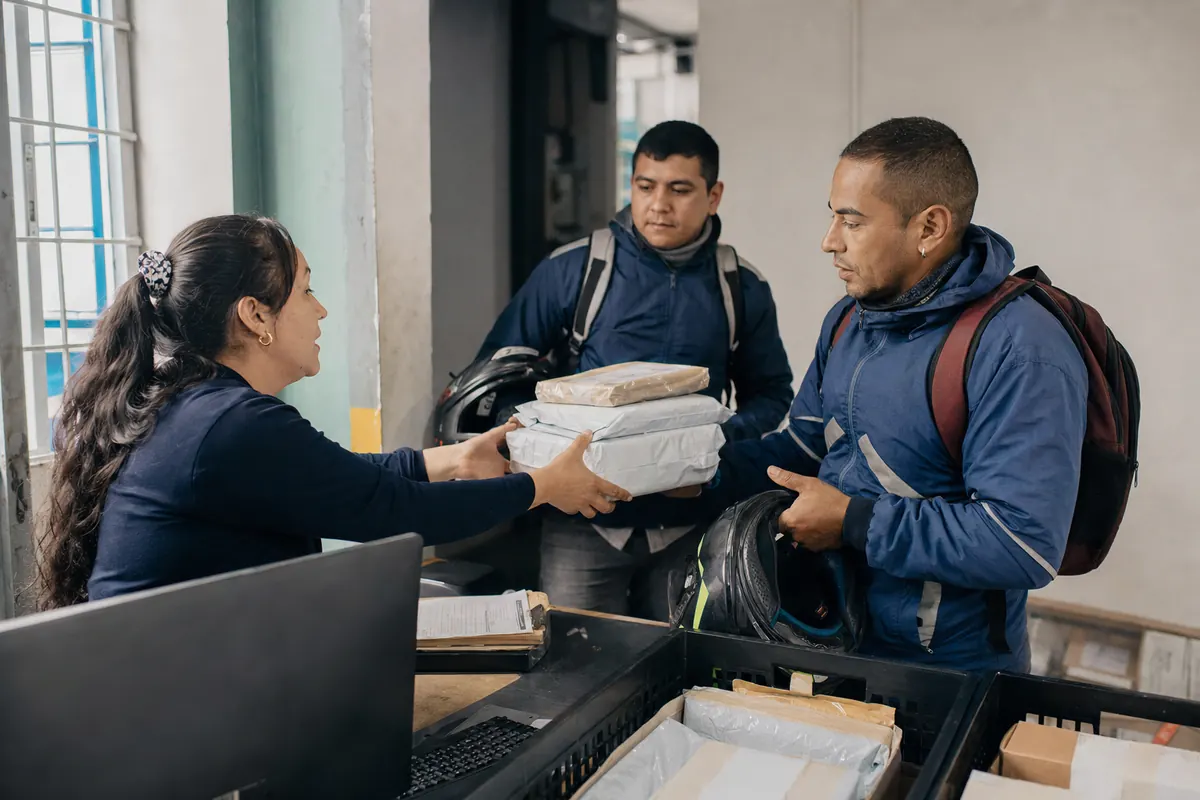
With the manifest on route, each courier sees their deliveries on the phone.

Courier app recording a delivery with payment, proof photo and recipient signature
Step 4 of 8 · Courier app

Deliveries are recorded on the phone

The courier marks the delivery as successful or returned, records the payment and leaves the photo and signature of the recipient.

  • Delivered or returnedWith the exception reason as defined by the carrier.
  • Payment on siteCash, transfer or offset, with its receipt.
  • Photo and signatureThe photo is compressed and the signature is drawn on the phone screen.

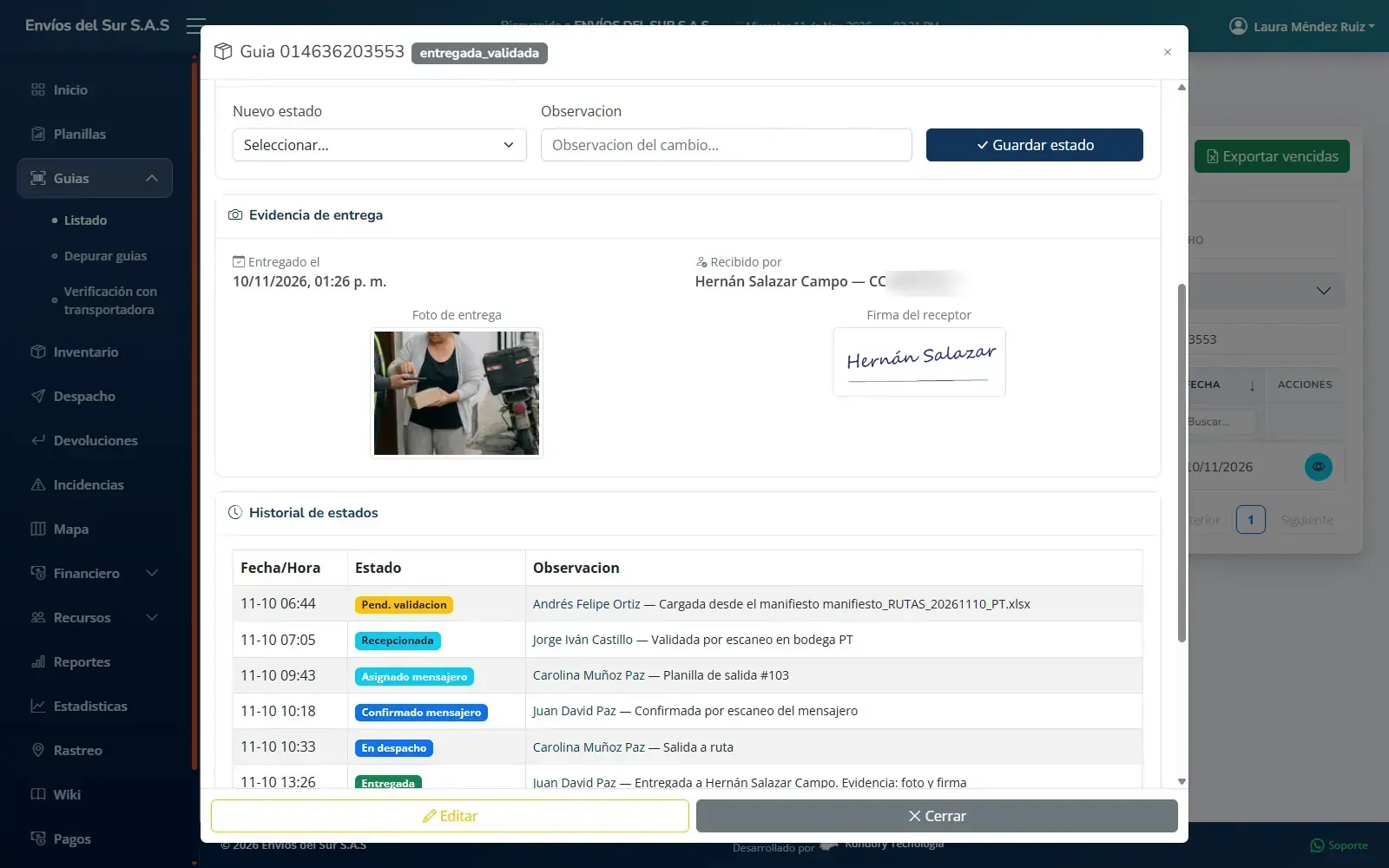
Each recorded delivery leaves its proof on the waybill record.

Waybill tracking with proof of delivery (photo and signature) and status history
Step 5 of 8 · Proof of delivery

Every waybill with its proof of delivery

The waybill record shows who received it, when, the photo and the signature, and the full status history with its owner.

  • Proof of deliveryDate, recipient, photo and signature, all zoomable.
  • Status historyEach change with user, time and note.
  • Report to the carrierAttach proof to a completed waybill and retry the transmission.

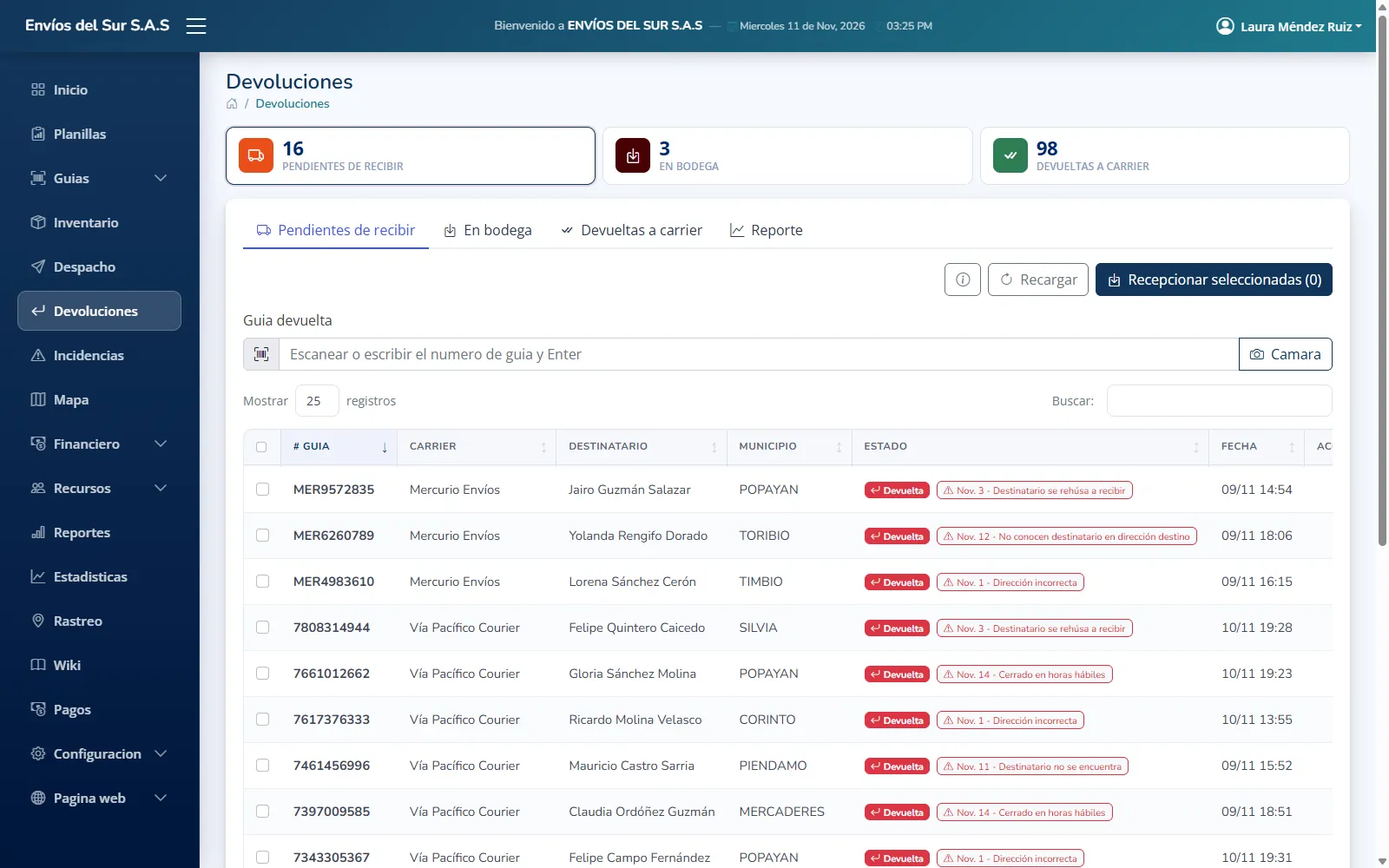
The proof is reported to the carrier; undelivered waybills go to returns.

Returns management with waybill scanning and exception reason
Step 6 of 8 · Returns

Returns, controlled all the way back to the carrier

What is pending to receive, what is in the warehouse and what was returned, with the reason for each exception.

  • Receive by scanningOne by one or in bulk, also with the camera.
  • Hand-over to the carrierIn batches, with their number and transmission.
  • Back to deliveryA returned waybill can go back out on route.

Returns go back out on route or to the carrier, and what was collected goes to reconciliation.

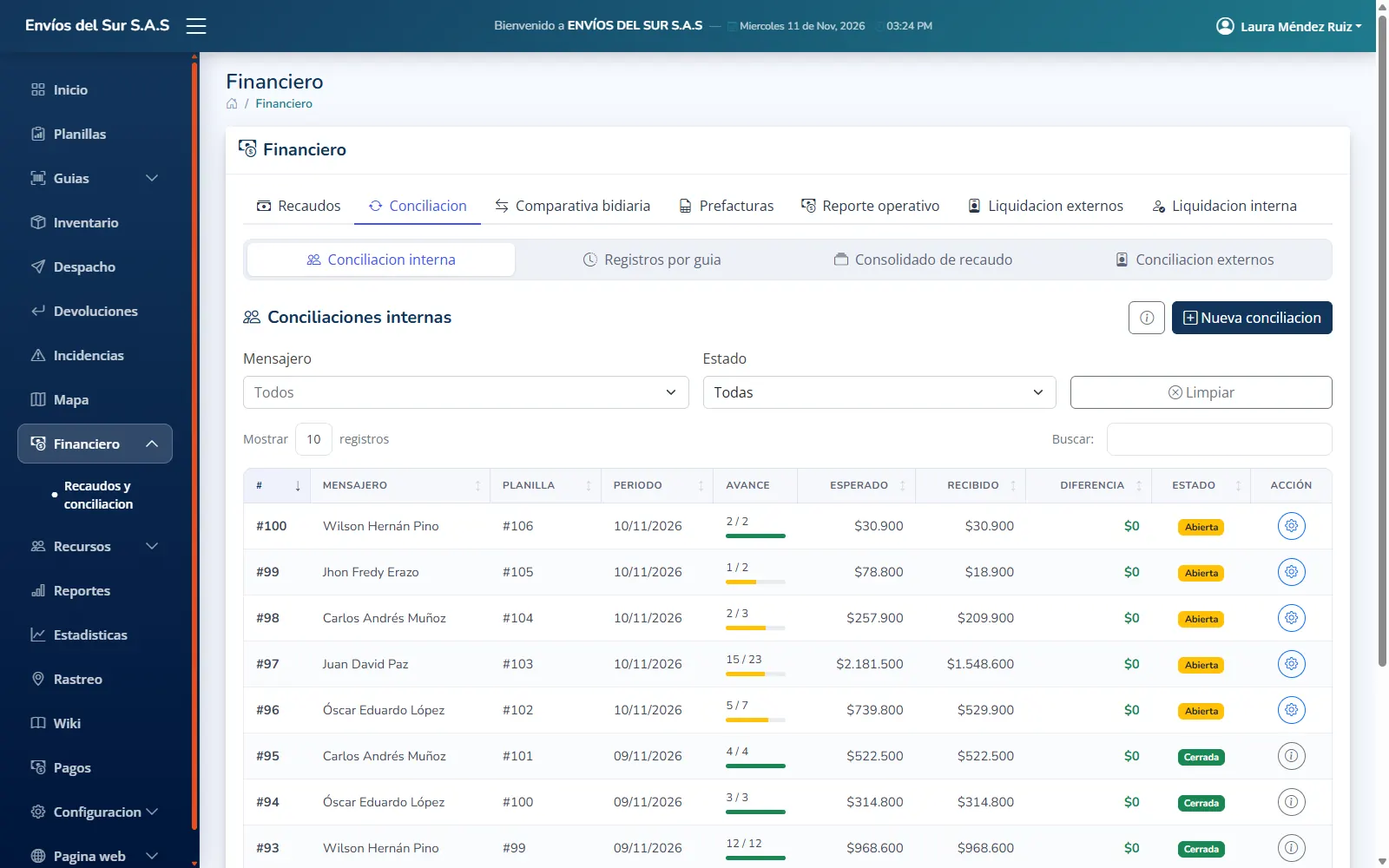
Reconciliation of each courier’s collections by manifest, with expected and received values
Step 7 of 8 · Collections

Each courier’s collections, reconciled

Reconciliations by courier and manifest with expected, received and difference, up to the consolidated transfer.

  • Internal reconciliationBy courier and manifest, confirming waybill by waybill.
  • Consolidated collectionThe transfer with its reference number, as a PDF.
  • External reconciliationMatches the carrier’s file against what was recorded.

With collections reconciled, the consolidated transfer is prepared and the dashboard is updated.

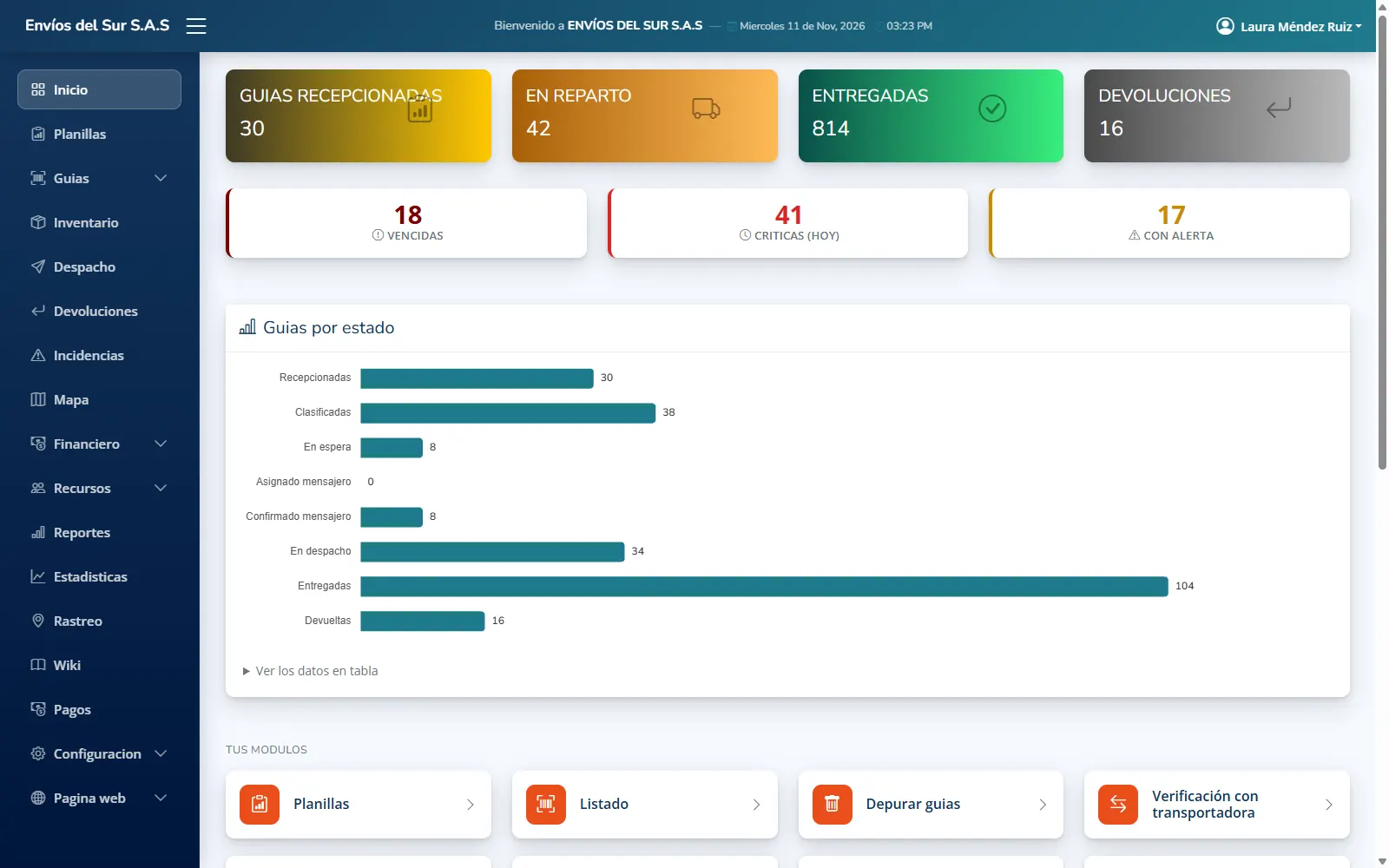
Last-mile software dashboard with waybills received, out for delivery, delivered and returned, due-date alerts and a chart by status
Step 8 of 8 · Dashboard

The day’s operation on one screen

Waybills received, out for delivery, delivered and returned, due-date alerts and how waybills are spread by status.

  • Counts by stageReceived, out for delivery, delivered and returned as you log in.
  • Due-date alertsOverdue, critical (24 h) and warning (48 h), linked to the filtered inventory.
  • Waybills by statusThe full life cycle in one chart, also as a table.

It closes the loop: the status of every waybill of the day and what is about to expire.

Real screenshots of the platform (in Spanish) with sample data.

What you get

What changes in your operation

  1. 01

    The whole shipment cycle lives in a single web platform, from waybill intake to collections and reports.

  2. 02

    Every delivery is backed by a photo and the recipient's digital signature, with date and person in charge.

  3. 03

    Waybills, statuses and proof are synced with carriers such as ENVÍA and Solistica (AGV).

  4. 04

    Any recipient can check their shipment by waybill number on a public portal.

Common questions

Frequently asked questions

Can I get the last-mile software for my company?
Yes. Kondory implements it and fits it to your operation: your carriers, your zones and the way you dispatch. If you need something it does not cover, it is extended through custom software development.
What problem does it solve?
It brings the full delivery cycle into one web platform, from waybill intake to collection and reports.
What features does the last-mile delivery platform have?
Tracking with a public portal by tracking number, photo proof and digital signature, a courier app, dispatch and routes, warehouse by zone, shelf and locker, and collections with reconciliation.
Does it integrate with carriers?
Yes. The platform connects with carriers such as ENVÍA and Solistica (AGV) to import waybills and sync delivery statuses and evidence.
Can it be adapted to my company?
Yes. It is configured with your carriers, zones and couriers, and extended with custom modules. See also enterprise software development or book a consultation to review your operation.
Get to know the system

Book a demonstration

Choose a time that works for you. We will review your operation and answer your questions about the system.

Choose a date and time Open the calendar in a new tab